
The shape of the workbench
When you open a case you'll see five tabs and a sidebar. Each tab is one part of the assessor's job:
|
Tab |
What it covers |
|
Assessment |
Claim summary, benefits, requirements and the assessments themselves. |
|
Tasks |
Anything that needs doing, with a due date and an owner. |
|
Notes |
A timeline of internal commentary against the case. |
|
Documents |
Files attached to the case. |
|
Financials |
Provisions, payments, and the reinsurance position. |
The sidebar stays put as you move between tabs. It shows the life insured, the claim contact, the adviser (if there is one), and the payees. The bar across the top shows the case status and the key facts of the claim.
The shape of a claim
A claim moves through a small number of statuses on its way from notification to payment. The diagram below shows the typical paths a case can take. Status changes can be automatic (when the system reacts to an action) or manual (when an assessor sets the status from the dropdown).
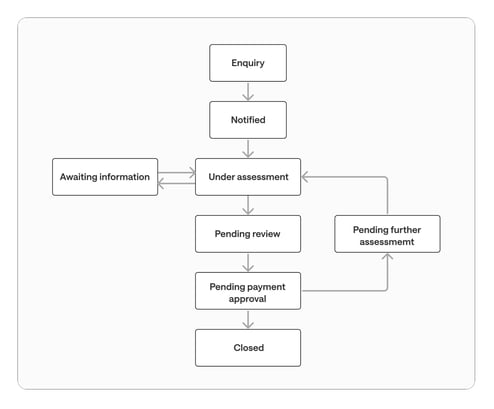
Rejected assessments send the case back to Under Assessment for re-work. Closed claims can be reopened, which also returns them to Under Assessment. Recurring claims cycle between Pending Further Assessment and Under Assessment as each new assessment period is worked through.
Walkthroughs
1. Lodge and pay a lump claim
2. Assess a recurring disability claim
3. Handle a claim that doesn't qualify
4. Handle a rejected assessment
5. Receipt a reinsurance recovery