
Create a flexible arrangement schedule for collecting premium payments, regardless of whether the policy is in arrears or not. It is fully flexible in the sense that an operator can set up an arrangement for any amount (doesn't have to be the full overdue balance), over any number of new payment dates.
Account prerequisites:
- User permission: Policy update

Sarah pays $50 per fortnight for her policy premium, but she recently missed her last two premium payments due to unexpected expenses and is now $100 overdue. Knowing she'll have extra funds later, she contacts her provider who advises that a Promise to Pay may suit her needs. They agree on splitting the overdue balance up into weekly payments of $20, allowing Sarah to gradually pay off the overdue amount while still making her regular payments as usual.
Setting up a Promise to Pay
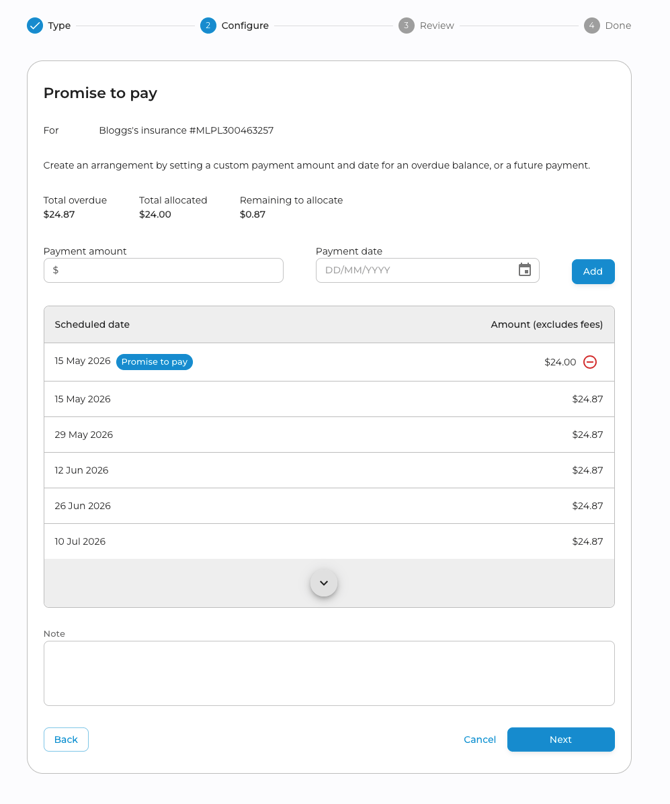
- To create a Promise to Pay, navigate to the relevant policy and click on "Create payment arrangement" in the Actions menu.
- Enter in each payment amount and new payment date, then click "Add" to populate the new payment in the upcoming payment schedule. Repeat as many times as needed, noting that you don't need to allocate the full overdue amount.
 Once complete, add a note and click next. The payment arrangement note will not be visible to the client.
 - After reviewing and confirming the updated schedule, click Confirm to make the arrangement effective. If the client has email as their preferred method of contact, they'll be sent confirmation of the payment arrangement. See the Client Contact Information article for more details about communications.
Please note - there must be at least one remaining payment on the current policy term in order to add a Promise to Pay.
Cancelling a Promise to Pay
A promise to pay arrangement can be cancelled manually via the Partner Portal..
Manual Arrangement Cancellation
- Under the Variation section of the policy Payment tab, expand the arrangement you'd like to cancel. Click the
 button, enter a reason, and confirm.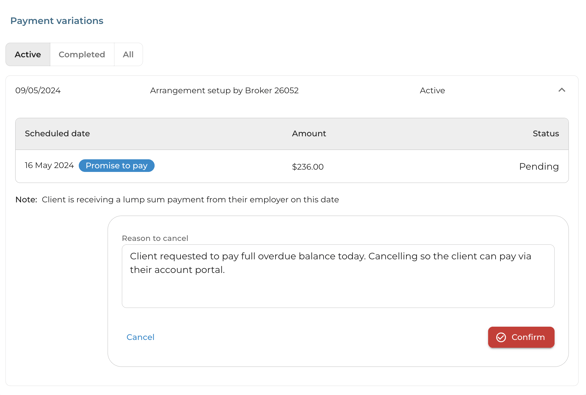
If a client fails to pay a Promise to Pay installation, the remaining instalments in the arrangement will not be cancelled or changed in any way. The missed instalment will be treated as an overdue balance and the system will set up and automatic arrangement on the next day (assuming another manual arrangement isn't set up prior).
Automatic arrangements and partial payments
If a policy is in arrears, the system will automatically set up an arrangement to take the overdue balance on the upcoming due date. See this article for more info.
However if a Promise to Pay has already been set up to cover part of the overdue amount, the system will recognise this and set up the automatic arrangement to only capture the remaining overdue balance.